It is very interesting to know that Google is ranking tweets which is a welcome news for all those who are involved in online marketing. We all know about Google’s and Microsoft’s deal with Twitter, which enables these companies access to Tweets to enhance the real time search results. As a result Google has started showing Tweets along with its normal search results.
Factors Determining Digg’s Upcoming Hot Section
Digg is the most active and hottest social media site around which is used for sharing online content, by link submissions, voting, commenting etc. Rather than calling it a social media site, it is better to call it as a social news site. I have already mentioned about Digg, managing your Digg profile, tips for submitting contents to Digg etc in my earlier posts.
In this section I would like to write something about the factors that influences the stories in Digg’s upcoming hot section. Before that you need to know something about the upcoming section in Digg. The upcoming section is that part where the stories are stacked before being popped out into the front page. There are mainly 3 types of upcoming section which are the recommendation section (based on your profile), upcoming most section(links having most Diggs) and upcoming hot section (the hottest link in upcoming section).
10 Tips for submitting content to Digg
Digg is one of the most prolific social book marking site, which helps in generating traffic to any website. People submit content, images and video to Digg and the best stuff will be voted by other users and would be promoted to the front page, which in turn generates huge traffic to the site where the content, image or video is hosted.
There are various factors to consider and check while submitting something to Digg. These factors plays a major role in deciding the fate of the content, which is being submitted. If these factors are positive the chances for a content, image or video to pop out onto the front page is high. Here we would be discussing some major things that we should take care while submitting content into Digg.
Always Keep Your Twitter Account Clean
Twitter has evolved as one of the most powerful social media tool and a lot of users are newly being registered with it. But many of them actually are not aware of the purpose and the effective way to use Twitter. For all the newbie in Twitter, I am listing here some basic things to take care for effectively managing your Twitter profile. These basic things will surely help you in the long run.
8 Basic Steps For a Better Digg Profile
In my earlier post on Digg, I had given a brief introduction on Digg. That was just for the beginners who needed to know something about this social book marking news site. In this post I would like to brief, how to be an active Digg user.
1) Create a Profile
If you would like to be a part of the Digg community, the first thing that you should do is to create your own profile with Digg. Try to create a unique and catchy username, so that we it would be remembered by other Digg users. Upload a profile picture and also add a small bio through which people would be able to understand something about your interests.
2) Start Reading
Start reading the news and articles on the front page as well as the upcoming section of Digg. You can see a lot of interesting and amazing news, facts, images, videos etc which might be interesting to you.
Twitter Lists. A New and Great Way to Organize Your Followers
Twitter has introduced a new feature named Twitter Lists, which helps you to organize your followers and followings. This feature is in its beta stage and was thrown out to only a select few users. I was really surprised to see this feature on my Twitter home page and was curious to know about it. This feature helps you to discover new and interesting Twitter accounts. You just to create a new list from your Twitter home page and don’t forget to give this list a suitable name. You can access this list directly by typing twitter.com/(your twitter profile name)/(list name).
[Read more…]
5 Social Bookmarking Sites that Drives Huge Traffic to a Website
Social Bookmarking sites allows you to bookmark your favorite websites / web pages and access it from anywhere in the world. Social Bookmarking sites are the best sources to get traffic to your site, provided used in the proper way. A lot of social bookmarking sites have surfaced since last few years and all these book marking sites are used in order to get adequate traffic to websites. Social Bookmarking also serves as a good resource for getting back links and these sites are regularly indexed by search engines. Among all the social bookmarking websites available, there are some sites which send enormous traffic to your site. As per my experience, I would like to list the top 5 social bookmarking sites that have send traffic to my websites all along. The listing is in the order of the amount of traffic generated.
Digg – A Beginner’s Guide to Digg
This posting is for those who are new to Digg, the King in social media site, or those who wish to know more about Digg and its functions.
Digg is among the top social bookmarking sites around and is known for its popularity and the amount of traffic it brings to a site. Digg is mainly used to submit and promote sensational news, articles, blog postings, videos, images etc which creates some sort of wave among the users. Digg is one of the most used social media sites, and is one of the best social media sites to drive traffic from, if used in the proper way. Digg was started back in 2004 by Kevin Rose, Owen Byrne, Ron Gorodetzky, and Jay Adelson. Many other social media sites today has drawn inspiration from Digg. [Read more…]
Now You Will not Miss Your Friend’s Digg Submission…….
Digg is one of the most popular social media site and is mainly based on social bookmarking. This is generally a social media site for news and other interesting stuff, where the best articles and news gets more votes and enter the popular page of Digg. Once it enters the popular page it would stay there for a few days depending on the quality and popularity of the articles. An article or news on the front page of Digg is sure to get enourmous traffic till it stays there.
Earlier there was an option to share your news or article with your network in Digg, but a few weeks back Digg removed the sharing / shouting option. Now you have to promote it via Twitter or Facebook, for which you need to have a good network in both Twitter and Facebook. The problem now is that you are not able to recieve your friends submissions or share via your Digg account. Instead you have to search Twitter or Facebook for that and with this you wont be able to see most of your friends articles who are not active on Twitter or Facebook.
 Few days back I found a tool named Sub Digger Plus, which helps in keeping track of your friend’s submissions and also saves a lot of time.
This tool has a lot of facilities and would surely prove to be a much useful Digg tool. The tool is easy to use and you just need to enter your Digg user name into the box provided and you would be getting your friend’s submissions for the last 24 hours. You would be able to view your friend’s submission one at a time, and to view the next submission you have to click the next button provided at the bottom. You can also get the complete Diggs in last 24 hours listed in a single page by clicking the List View button. You can also easily mark the stories as read or unread.
The tools shows the original page or article submitted to Digg along with the Digg toolbar, which shows you username of the submitter, his avatar, title, url etc. With the List view option, you can also filter and sort the complete submission list. The Sub Digger Plus tool bar is compatible with the major browsers such as Internet Explorer, Firefox and Chrome. Hope ths tool makes your Digg campaign a successful one and lets also hope that Digg would not penalize or ban us from using this much useful tool….
Twitter Analyzer….An Amazing Tool to Analyze Your Twitter Profile
There are many online tools for managing ones Twitter account, and I have mentioned about some 10 Twitter tools which are very much useful in managing your Twitter profile. This week I came across another interesting online tool for analyzing your Twitter account and is known as Twitter Analyzer. Twitter Analyzer provides an excellent graphical representation of your Twitter account performance which is very much helping in evaluating your Twitter account. This tool is one of the best I have seen so far when consider such similar tools.
 To use this tool just enter your Twitter username into the text box provided in the main page of the website. You can see a graphical representation of the number of Tweets per each day. If you click on the number of Tweets on any particular day on the graph, you would be able to see more detailed information. These information include details such asTotal Update Messages, Total Updates Retweeted, Percentage of Updates Retweeted, Unique Users Retweeting etc.
At the bottom of the Tweet Analyzer dashboard there are certain buttons which are very much useful, and these buttons are named User, Friends, Mentions, Groups, Trends and Fun. I would like to elaborate all these buttons individually to you and these are based on my limited knowledge only.
User
This button contains default user information such as the number of Tweets on each day, retweet ratio, unique user retweet, unique readers reach etc. There is another sub button of the User button named Chats which tells you the details about the message interactions between you and your followers. There is another button named Popularity which tells you about your popularity rate, i.e how many times your profile name has been mentioned in Twitter. Another button named Reach determines the number of readers that have been exposed to your messages. The button named Subjects gives you an idea about the tops subjects that you are Tweeting about. The Hash Tag buttons tells you about the top Has Tags that you are using in your Tweets. The Links button tells you about the tops links that you have used for Tweeting. And Finally the Apps buttons gives you the details of the top Twitter applications that you are using to Tweet your messages.
Friends
The Friends button in Twitter Analyzed is another interesting button which gives you an idea about your friend’s activities. There is a sub button named Online Followers which give you the number of the total followers that are online which you login to your account at any point of time. The button Followers Growth Rate tells you about how many new users you add or lose each day. The Followers Density Map gives you idea about the geographical locations of your Twitter followers. The Followers Activity button tells you information about how many of your followers are active on Twitter. The RTing Friends provides data about the follower who Retweet your Tweets the most. The Closest Friends button provides information on the friends that you contact the most. The Disregarded Friends button gives you the list of your most disregarded friends, ie the list of friends or followers who send you messages, but you didn’t reply them back.
Mentions
The Mentions button helps to see the list of friends that you most mention in your chats and messages. The My Mentioning – All sub button gives you the list of friends that you have mentioned most. My Mentioning – Updates tells you about the friends that you mention most in your updates. The My Mentioning – Social button tells you about the details of friends you most mention in your Chat Messages. TheMy Mentions – All button gives you the list of all the friends that mention you the most. The My Mentions – Updates button gives the list of friends who mention you the most in their Update Messages. The My Mentions-Social button helps you see the friends most mentioning you in their Chats.
Groups
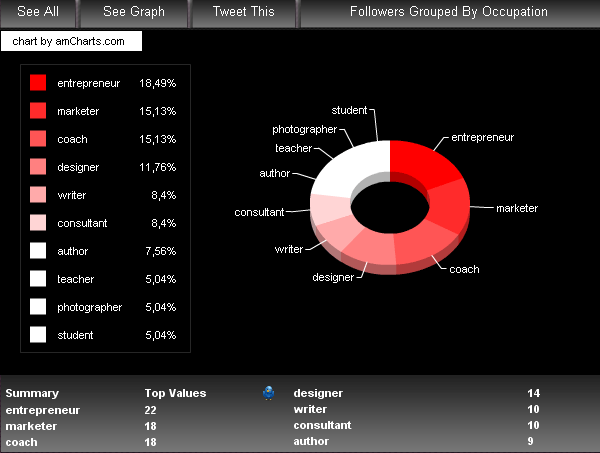 The Twitter Analyzer Group button allows grouping your friends by occupation, joining date, popularity, gender and actions. The Groups By Occupation sub button in Twitter Analyzer tells you details about the job and occupation of your followers. The Groups By Join Date button tells you about the join date of your followers. The Groups By Popularity gives list of your friends based on their popularity, and the button Groups By Gender arranges or groups your followers by gender. The Groups by Actions button help you see what your followers are doing the most.
The button Trends and Fun are yet to be live and are under development. Hope they must provide more interesting facts and figures to this already amazing tool. I hope you all will enjoy this tool and would start using this in your day to day tweeting process. Thanks…
Recent Comments