New Way to Run Local Ads in Google Adwords

We need to have local business ads as a separate ad unit in Google Adwords in Order to run local Ads. Now Google is ready to come up with the local extension feature which helps the users to create local ads by dynamically attaching your business address to ads. This feature also helps to add the extensions to your existing text ads. Business owners can set up this extension by linking the Adwords campaign with Local Business Center (LBC) and others have to manually enter the address into Adwords. The address along with the ads would be shown based on the relevancy of the search. If there is not relevant address based on the search, then no address would be displayed on the ads.

With the coming of location extensions, the local business ads would no more be  a separate ad format. The local extension feature also gives more variety to your audience targeting. The local extension feature helps  to reach the local customers in a more effective way and showing them relevant information. In short the feature helps in promoting  the business brand, products, services, and associates your business with a specific location of interest to the user.  This is applicable whether the ad appears in Google Search, Content Networks, Google Map and Google earth.

The steps for adding or editing the ad’s address extensions are given below.

1) Log into your Adwords account.

2) Select the campaign which you wish to edit.

3) Click on the Settings tab.

4) In the settings area go to Audience – > Locations and select one of the options shown under Show relevant addresses with your ads.”
a) Business Owners
b) Non Business Owners.

5) Then Click Save.

Hope this becomes useful for who needs to adding/editing their address extensions.

Does Just Getting Backlinks Guarantee Better Results on Google?

We all know that getting backlinks to our site plays a major role in getting better search engine placements. Most webmasters try to get as many inbound links as possible to ensure better search engine ranking for their site. This is a good ploy, but at times a website with more back links than its competitor may be ranking lower for the same keyword when compared with its competitor. This is a general scenario most webmaster faces and this issue should be deeply looked into. There are various reasons why a website with more inbound links than its competitor is losing the battle in the search engine rankings with its competitor for the same keywords. Just getting many backlinks alone does not aumatically make your site keywords rank highly.

As we all know that Google determines the ranking of websites in search results based on various metrics such as onpage and offpage factors.
On page factors are those which are visible on your website by making changes in the HTML code. On the other hand offpage factors are those factors that are not visible on your website but are done by working on external sites. So both offpage and onpage factors plays an important role in your search engine results. Offpage factors inlcudes link building activities such as article submissions, directory submissions, promoting the site through forums, blogs, social media sites etc. There are are certain parameters to keep in mind while getting backlinks for your site.

1) Try to get better backlinks, i.e quality backlinks from sites which are relevant to your site content.
2) Avoids links from link farms, low grade directories and other spammy sites.
3) Try to get links from pages with better page ranks, ie, 3 and above.
4) Add compelling content on your site and prompt other webmasters to link back to you.
5) Try to get your major keywords included in the anchor text of your inbound links.

These are the basic offpage factors needed for you to have an edge over your competitors in search engine results. Try these things and I am pretty sure that the results would be there at the doorstep for you.

10 Blog Directories You Should Submit Your Blog To

When you plan to set up a blog, there would be many factors that come to your mind. First the blog should be neat, the content should be compelling and the most importantly the blog should drive traffic. More traffic means more readers, followers and other extra income. So usually we try to make the blog as Search Engine friendly as possible and add all the available SEO plugins. Also we try to take care while deciding on the keywords, to get more traffic. Apart from this we also try to get links from other sites, which are very much related to our blog in terms of content. Another way to promote your blog is to submit your blog to various blog directories, which contains list of the blogs and are arranged according to the theme of the blogs. These directories make it easier for other to find blogs related to their interest and helps us in getting targeted visitors. There are various blog directories available, but I would like to list 10 of them which I have found useful.

1) Bloggeries – Bloggeries is a good blog directory which accepts blogs and has various sub categories. It also has features such as forums, listing of the most viewed blog, latest blogs etc.

2) Blogged.com – This is a free directory and shows the postings of the blogs as a News feeder format. This has various features such as following others, starting discussion etc.

3) Blog Explosion – Blog Explosion is another free blog directory which helps in getting traffic to your site. Once you submit your site, it would take up to 7 days to get your site approved or rejected.

4) Super Blog Directory – This is another blog directory with useful features such as the latest submitted links and blogs, most popular blogs, top rated blogs etc.

5) Bloggapedia – Bloggapedia is another free blog directory with a good layout and helps to see the most popular searches in the directory.

6) Bloggernity – Another blog directory which is free and worth for blog submission. Offers features such as forums, blog search etc.

7) Blog Universe – Blog Universe is another unique blog directory which is used to submitted video and podcast blogs.

8 ) Blogcatalog – This blog directory serves as a social community for bloggers and helps in searching, connecting with other bloggers, promoting your own blog etc.

9) Blog Hub – Another important blog directory with features such as new blogger list, hot topics etc.

10) Spill Bean – Spill Bean is another attractive and simple blog directory which helps you to submit your blog for free.

There might be other blog directories which I have missed, but these 10 directories seem to be more important to me. Hope you have enjoyed reading this.

The Two URL Shortener Tools That I Use

I mainly use the URL shortener tools for using it through Twitter. Since Twitter allows only 140 characters per post, it is difficult to Tweet posts with longer URLs.  The URL shortener tool shortens the long URL and makes it suitable to post via Twitter. When a visitor clicks on this shortened URL the visitor get redirected to the original URL. The two main tools that I use for this purpose are BudUrl and Bit.ly.

Initially I used BudUrl for shortening my URLs and posting them in Twitter. This tool gives the number of clicks occured on that shortened URL along with the IP address and IP Host name. The tools also offers advanced features and graph if we upgrade our account, but since I am not interesting in upgrading I didn’t go for that. The main drawback that I noticed with BudUrl is that there was a huge difference in the number of clicks shown in BudUrl and Google Analytics. For example if BudUrl shows 20 clicks, only 2 or 3 clicks would be displayed in Google Analytics and that too in the direct traffic section. I am still not able to find why this difference occurs.

Then I started using another URL shortener known as Bit.ly, which I found bit more interesting. This Then I started using another URL shortener known as Bit.ly, which I found bit more interesting. This tool showed features such as the number of clicks, referrers, locations etc. There was no option for upgrading, but the main thing that I was interested was that the difference in the number of clicks shown by Bit.ly and Google Analytics was not too high when compared to BudUrl. For example if the number of clicks in Bit.ly was 20, then Google Analytics showed 16-18 and that also in the direct traffic section.


How to View Search Engine Results for Different Geographical Regions?


One of the major issue that I faced while rendering services to my foreign client, was the differences in the keyword ranking on Google in different countries. For example, if my client is in the US and when I checked for a particular keyword from India, the keyword was appearing on the 3rd position. The same keyword was appearing at the 5th position in the US, and it created a some issues when sending keyword reports and similar stuffs. I tried some free proxy servers to surf anonymously but at times that also did not give me the exact keyword ranking in US. Usually these free proxy servers turned out to be too slow in loading. So after browsing and searching the net, finally I found out a useful tool, which helps in checking the keyword ranking in various geographical locations.

This tool is known as the Google Global Firefox Extension V2, and is used to view the organic as well as paid results in different geographical locations. This tool works with Firefox and has to be downloaded and installed into your browser. This tool is relatively easy to use and you have the option to use it in 2 ways, either as a contextual menu or as a toolbar in the browser.

Google Global ToolFor example after installing the Google Global tool from the location http://www.redflymarketing.com/blog/google-global-view-results-different-locations/, consider that you are searching for something in Google and seeing the results in the result pages. Right click on the results page and you would see the “Search Global Option” in the menu. Select this option and select the suitable geographical location that you need to see, and you would be able to see the Google results for that selected geographical region.

To use it as a toolbar in the browser first install it from http://www.redflymarketing.com/googleglobal/google_global-2.0.4.xpi. The steps are as follows.

a) After installing the tool restart the Firefox browser, and click on an empty area on the browser menu area.

b) Click on the Customize button and locate the Google Global icon.

c) Drag the Google Global icon to any suitable place on the browser tool bar.

d) Now you Google Global tool bar is ready for you to use.

Google Global Browser Tool


How to Calculate Google CPC for Your Keywords?

CPC stands for Cost Per Click, and is defined as the amount of money any advertiser has to pay search engines for single clicks on its advertisement placed on that particular search engine or advertisement media. CPC differs for different keywords, and also differ in various search engines. In CPC you need to pay the search engines only if you Ad is clicked, and the amount needed to be payed is decided at the time of keyword bidding for any particular keyword. Keyword bidding is done using different keyword research tools and we can decide on the keywords and the amount that has to be payed for each click.

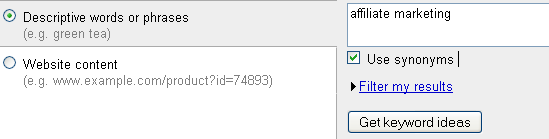
Here I would like to write something about CPC in Google and the way to find the CPC amount for a particular keyword. Google offers a free keyword research tool, and is commonly known as Google Adwords Keyword Tool. Just go to https://adwords.google.com/select/KeywordToolExternal and you can enter the keywords and get different information regarding those keywords.

Google Keyword Tool

The steps are given below.

1) Go to https://adwords.google.com/select/KeywordToolExternal and enable the Descriptive words or phrase radio button.

2) Enter Your Keyword, e.g “affiliate marketing” in the text box provided and press the button named Get Keyword Ideas.

3) Now you will get a list of information related to that keyword with information such as Advertiser competition, local search volume, global monthly search etc.

4) On the top of the table there is a drop down box named Choose columns to display. From that box select Show Estimated Average CPC option. Now a new field named “Estimated Avg. CPC” will be seen, which contains the average Cost Per Click for that amount.

5) Usually in India the Indian Rupees is the default currency type. If you want to change it to other currencies you can change it from the drop down box which appears on the top of this table.

6) By executing a single click on the Estimated Avg. CPC link, you can get the list in the reverse order of CPC.

I hope this would provide useful for those beginners in Search Engine Marketing (SEM), but for those experts in PPC this would not provide enough.
Google Adwords Tool

Organic Traffic Vs Paid Traffic. Which is better?

Organic Traffic and Paid Traffic are the two factors that helps in bringing traffic to your site. These things are one of the main factors that webmasters and website owners are more concerned of these days. Before going into the details let me first introduce you to the terms Organic and Paid traffic.

Organic Traffic : Organic Traffic is the traffic that our site gets through the natural searches through search engines. This is very cheap in terms of cost and also takes a bit of time for your site to be visible in the search engines get traffic from them. An example of organic traffic is given below.

For example, consider you are a shoe manufacturer in California and you own a website. When people search for “shoe manufacturer” in the search engine, consider that your site is coming in the top 10 list. When someone click on your link on the search engine and enters your site, you are indeed getting an Organic Traffic. In order to get you website on the top page of the search engine for a particular keyword, your website has to be well optimized for various search engines. Once you site get neatly optimized you are bound to get organic traffic for a long period of time, i.e 6 months to one year. You don’t have any additional extra costs rather than the initial optimization phase. Organic traffic is the best way to drive traffic to your site and is widely adopted by website owners all over the world.

Paid Traffic : Paid Traffic is the other type of traffic that come to your site, by paying for every traffic that comes. Paid traffic is recommended for those who needs instant traffic for their site and does not have the time for organic traffic to happen. Paid traffic is the major essence of Search Engine Marketing and it requires proper planning and strategy to execute the paid traffic technique. There are many forms of paid traffic like paying for search engines to get listed, banner advertisement and other forms of advertisement where you need to pay for getting traffic.

For Example, consider you have a new business site and you don’t have the time to wait for the organic For Example, consider you have a new business site and you don’t have the time to wait for the organic traffic. Here you need instant traffic from the search engines, say Google. So you have to go for the Google Adwords PPC, which is the most popular form of paid traffic. Here you pay for Google to get listed on the sponsored links in the Google search engine results page (SERP). When somebody clicks on your link you have to pay Google a certain amount and as a result you would be gaining instant traffic, but you have to maintain your monthly budget so as to continue getting the paid traffic.

Effectiveness of Social Media in Generating Sales

Social Media is the latest thing in Internet  world and it has been there for around 3 years. Today a lots of social media and social networking sites are available, which have high potential in Online Marketing. People use social media sites to drive engagement, marketing and customer service. Most of the companies use social media for their marketing purpose and they also claim that they have been successful in achieving sales through these social media sites.

But many surveys and other pundits claim that the social media sites are not that much effective in generating sales. I am not willing to provide the details of the survey, but companies have a long way to go before it can make social media as a major sales generation tool.

Social Media is more of a conversation type and one has to be fully engaged and build his own network in social media, in order to become a successful social media expert. A successful social media campaign requires planning, dedication and the patience to carry out.  You have to have a great focus on your social media sites and communities, which also requires some time. You should be a good watcher, ie you should try to analyze and study the campaigns of other successful social media experts. In this way you would be able to gain a lot of information, which helps you in the long run.

Another major factor affecting your social media campaign is your communication. You must be able to communicate with your communities or friends, thereby sharing your information and increasing the chances of generating sales leads. If you are not having enough communication with your friends, followers, communities or groups, you might end as a unsuccessful social media professional.

The other thing that  needs special attention is creativity. In every advertising field one has to be creative enough to be successful. Foe example an advertisement with no creativity would not get noticed and would be a big flop. Similarly in social media also you have to be very much creative in presenting your services or information about your company. It is your creativity that drives traffic to your sites and thereby generating sales. Your presentation much generate some sort of curiosity among the users so that they may visit your site deeply.

Commitment is another factor that needs to be there for a successful social media marketing campaign. The competition in social media advertising and marketing is increasing day by day and you needs to be committed and hard working in order to stay afloat with the latest challenges and updates. You need to participate enough in social media sites to increase your reputation and credibility among the social media users.

The above things are some of the basic  factors which determines the effectiveness of social media in generating sales. Hope this also works with your social media strategies and techniques..

Something About Online Marketing…

The Online Marketing world has changed rapidly in the last few years and continues in the same phase. This is one of the most interesting field where you require to polish your skills every day.  In this blog I would like to blog something about online marketing, its trends, latest updates and more. This would cover topics such as Search Engine Optimization (SEO), Search Engine Marketing (SEM), Social Media Optimization (SMO), Web Analytics etc.

Apart from this, I would also blog on other general topics which are of my interest.  So I would reques you to be a part of this blog and follow it keenly as it promises very interesing posting ahead. Comments are also appreciated..Cheers!!!